Customer Payments Minus Credit Card Fees
Overview
This article describes best procedure for the processing of a Customer Payment via Credit Card when the credit card company will deduct their fee and then direct deposit the balance into your bank account. This process achieves the dual goal of 1) giving a customer a receipt for the full amount
paid and 2) being able to perform a bank reconciliation for the lesser amount.
Process Steps
1. Customer Payment
2. Journal Entry for credit card fees
3. Bank Deposit
4. Bank Reconciliation
Customers Payments Minus Credit Card Fees Video
Process Steps
1. Customer Payment
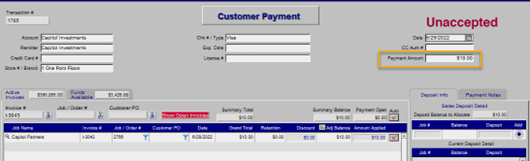
Post the full payment. When the customer pays $10 with a credit card,
it is very important that the person processing the credit card should
post the full $10 payment on the Customer Payment screen and have the
ability to give the customer their receipt for the $10 payment. It is
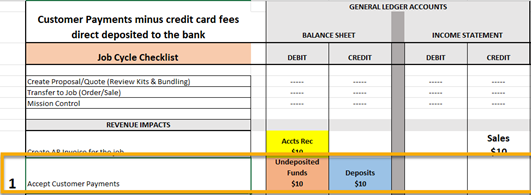
important to realize the automatic GL postings associated with a
Customer Payment. When Accepting a Customer Payment, the system will
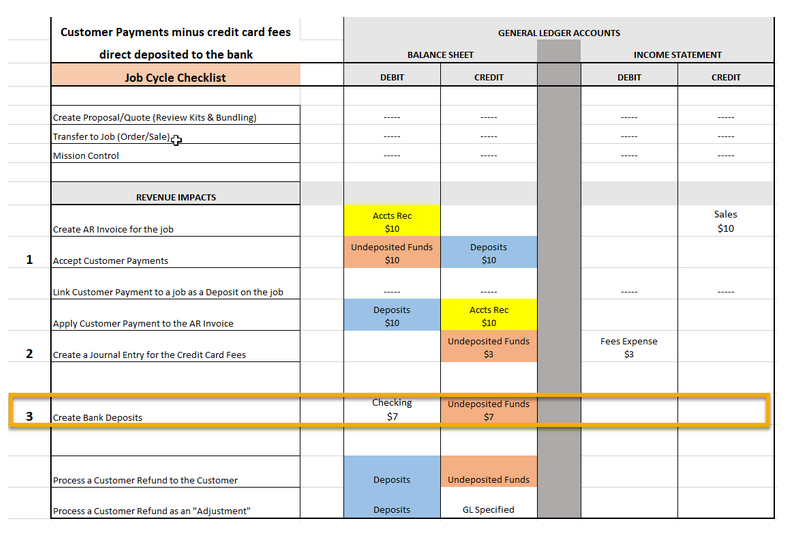
Debit Undeposited Funds GL and Credit (Customer) Deposits.
NOTE: the Undeposited Funds GL activity is what appears on the Bank Deposit screen in Step 3 below.
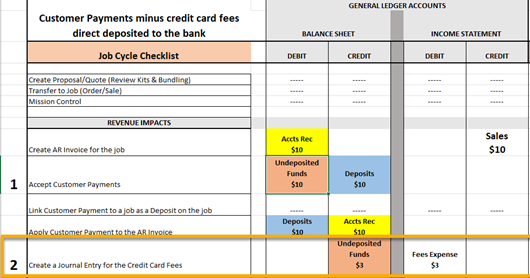
The chart below represents the GL Posting Accounts being affected as a Debit or Credit.
2. Journal Entry for credit card fees
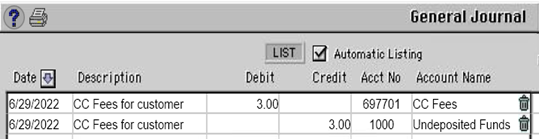
There has to be a journal entry for the fees, whether it be per
transaction, daily, weekly, or monthly. ( The Entry should coincide with your Deposit Ticket creation dates, or at the very most, your Bank Reconciliation date.) Be very mindful to post the
Credit to the
Undeposited Funds GL
so that when performing the Bank Deposit, both the Customer
Payment and the associated fee will appear on the screen to simplify
that process.
3. Bank Deposit
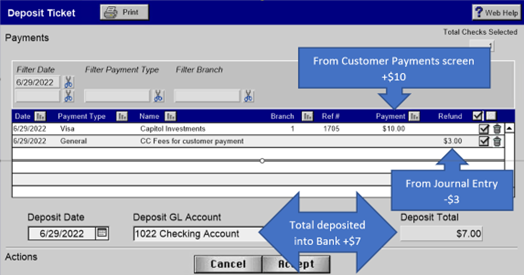
The Undeposited Funds GL activity is what appears on the Bank Deposit screen. Use the Bank Deposit screen to show both the $10 payment and the $3
fee. Use the
"Combined" option during the Deposit process. The result is a Deposit to the Checking Account for $7.
The automated journal entries are a Credit to Undeposited Funds and a Debit to the Checking Account for $7.
4. Bank Reconciliation
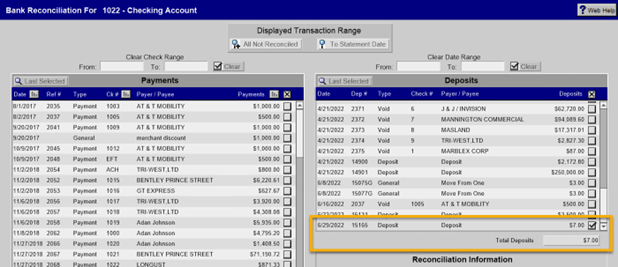
The Bank Reconciliation screen sees only the $7 deposit which should match the bank statement. Simple and clean.
Note: There are no journal entries generated by the Bank Reconciliation screen.
Customers Payments Minus Credit Card Fees Video
10 Minutes