Overview
FloorManager calculates commission on a job-by-job basis. You must set the commission before the commission owed report will display any information. If your report doesn't display information, check that you have a commission structure set up for each salesperson. Once the commission structure is set up, you may need to "update" unset open jobs with the new structure. It may also be necessary to refresh the salesperson's name at the job by re-selecting it.
Preparation
Run the Confirm Jobs and Confirm Payments maintenance routines from the admin area prior to running any commission report. The ensures all jobs have been refreshed for any recent activity.
Process
To set commissions, you will open the profits tab at each job and click the “Set Comm” button at the top toolbar. Proceed through the commissions set message and then specify a commission set date. Typically, the commission set date is the last date of the commission processing month.
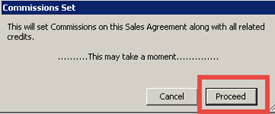
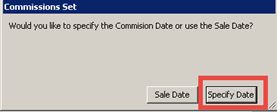
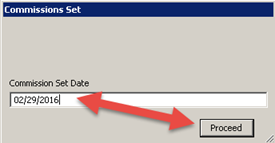
The commission may also be set en masse using the maintenance routine to set commissions across a large found set. Be sure to read the paper on the automated commission setting process to learn more.
Once the commission have been set, the information will be available for review on the Commission Owed Report. Navigate to the reports area and click on the Commission category.
Select the “commissions owed” report and enter a date range (preferably ending with the last date you entered when setting commissions). Generate the report.
The report generates a summary report and offers a personnel-by-personnel detail option once the report has been generated. The summary report will show the cumulative commissions to be paid out per staff member.
Clicking on a magnifying glass next to a staff member’s name will display the detailed job by job and show commissions owed on each job.
From this screen, commissions can be manually adjusted (note the Edit message dialogue box above if necessary, either with a direct edit from this position in the process or by going to the job record and adjusting job cost results (such as adding admin costs that reduce profit thereby reducing commission). Once the controller is satisfied with the commission amounts for the period, all of the commissioned jobs may be set to “paid” status en masse by marking all jobs by all staff members “paid” on the summary screen.
Most users complete the commission process simply by working onscreen as illustrated above, and in addition to the steps of processing within the system, most businesses also print a paper copy of the final approved commissions to be (1) submitted for payroll processing and (2) filed for future reference as part of the permanent paper files/backup related to commission earnings.
Training-v22b-20220913BG-KB